Showing posts with label Tools. Show all posts

Wednesday, April 16, 2014

Chrome Remote Desktop app: access your computers from your Android device


Chrome Remote Desktop:
Securely access your computers from your Android device.
• On each of your computers, set up remote access using the Chrome Remote Desktop app from Chrome Web Store: https://chrome.google.com/remotedesktop
• On your Android device, open the app and tap on any of your online computers to connect.

how to:

Saturday, June 15, 2013

CPU-Z for Android


CPU-Z for Android

Android version of the popular CPU identification tool for PC/Windows., CPU-Z is a free application that reports information about your device.

- SoC (System On Chip) name, architecture, clock speed for each core ;
- System information : device brand & model, screen resolution, RAM, storage.;
- Battery information : level, status, temperature ;
- Sensors.

CPU-Z for Android

Wednesday, March 27, 2013

Google Translate updated with offline language packages and vertical text translating with camera


What's in this version:
  • Translate without a network connection with offline language packages (available on Android 2.3 and above).
  • Translate vertical text in Chinese, Japanese, and Korean with your Camera.
Break through language barriers with Google Translate:
• Translate text and speech between more than 60 languages
• Listen to your translations spoken aloud
• Input using your voice, handwriting, and camera
• Save your favorite translations for quick, offline access
• View dictionary results for single words or phrases
• Translate without a network connection with our offline language packages
(Camera input and offline translation are available for Android 2.3 and above.)
Translations between the following languages are supported:
Afrikaans, Albanian, Arabic, Armenian, Azerbaijani, Basque, Belarusian, Bengali, Bulgarian, Catalan, Chinese (Simplified), Chinese (Traditional), Croatian, Czech, Danish, Dutch, English, Esperanto, Estonian, Filipino, Finnish, French, Galician, Georgian, German, Greek, Gujarati, Haitian Creole, Hebrew, Hindi, Hungarian, Icelandic, Indonesian, Irish, Italian, Japanese, Kannada, Korean, Lao, Latin, Latvian, Lithuanian, Macedonian, Malay, Maltese, Norwegian, Persian, Polish, Portuguese, Romanian, Russian, Serbian, Slovak, Slovenian, Spanish, Swahili, Swedish, Tamil, Telugu, Thai, Turkish, Ukrainian, Urdu, Vietnamese, Welsh, Yiddish

Thursday, August 16, 2012

Flash Downloader: download Flash Player after deadline


Flash Downloader installs a launcher icon which, when clicked, will download Flash for your device from the official Adobe download site.

Note that Flash on Android is no longer officially supported, so your experience may vary. It's still great of course for iPlayer and the like, remember that Flash is not supported in Chrome.


Monday, August 13, 2012

NFC Task Launcher


NFC Task Launcher
NFC Task Launcher makes NFC useful for every day life. You can use a single NFC tag to configure your phone or perform actions when it is read.
You can do cool things such as:
- Turn on Bluetooth, turn off Wifi and start your favorite music app when you place it in a dock or scan a tag in your car
- Set your ringer to vibrate, dim the display and set an alarm when you scan a tag on your night stand
- Start up Wifi and automatically connect to your home network when you come home (this also works great for guests so they never have to enter your wireless network info manually)
Because the commands are written to the tag there is no service to sign up for and they work on *any* device with the app installed. Everyone who scans the tag will have the same actions performed. The list of possible actions is shown below as well as any task you configure with Tasker. Actions can be performed in any order and in any combination. The only limit is what you can come up with!
You can create:
- Task Tags
- Switch Tasks - use 1 NFC tag to toggle between two Task tags
- vCard Tags
- Smart URL Tags
- Text Tags
- URI Tags (Tel, SMS, Mailto)
Task Tags currently support the configure or execute the following tasks
- Turn Wifi on or off
- Turn Bluetooth on or off
- Make Bluetooth Discoverable
- Turn Airplane mode on or off
- Launch any installed Application
- Configure a new Wifi connection and connect
- Configure and enable Portable Hotspot
- Turn Auto-sync on or off
- Turn Auto-rotation on or off
- Turn Notificaiton light on or off
- Set Display brightness and auto-brightness
- Launch any Tasker Task (for users of Tasker)
- Chang Ringtone
- Change Notification Tone
- Changing Ringer Mode (Normal/Silent/Vibrate)
- Changing Ringer Volume
- Changing Media Volume
- Changing Alarm Volume
- Changing Notification Volume
- Set vibration
- Set Alarm (both a fixed time and as a timer)
- Check in with Google Latitude, Foursquare, Facebook and Google Places
- Send a tweet on Twitter directly from the tag
- Start / Stop media playback
- Turn GPS on or off (root Required)
- Turn Mobile Data on or off (root required)
- Changing Display Timeout
- Changing Auto-Rotation
- Changing Notification Light
A 4x1 and a 2x1 Widget are also included to show the last profile applied (or actions performed) as well as launch the app.
This application supports NFC Forum Type 1, Type 2, Type 3 and Type 4 Tags as well as third party NFC Enabled tags like the MIFARE Classic, DESFire, Ultralight and Ultralight C.

Wednesday, July 4, 2012

ISeeYou: A smart program that keeps the screen on while you are looking your device.


ISeeYou is a smart program that keeps the screen on while you are looking your device. This requires a front facial camera for face recognition. Ensure that your device is capable of recognizing your face. This Lite version let's you to start and stop the service and manage the Blind List without change the basic parameters such as the scan time or the scan delay.


Monday, June 11, 2012

Wifi Analyzer


Wifi Analyzer turns your android phone into a Wi-Fi analyzer!! Shows the Wi-Fi channels around you. Helps you to find a less crowded channel for your wireless router.


Monday, April 30, 2012

Wave Control - Control Your Phone With a Wave of Your Hand


Uses the proximity sensor on your phone to allow control of your music playback and calls by waving your hand over your phone.
No need to turn on your screen or even touch your phone at all!
-Want the next song? Just wave!
-Need to silence your ringtone quickly? Just wave!

Wave Control at Google Play

Wave Control for Android Demo


Wednesday, April 18, 2012

Android Speed Booster FREE

Android Speed Booster FREE
Install this Android Speed Booster App & you can double the speed of any Android phone.

The Android Speed Booster FREE...frees up your critical CPU resources which reduces the drain on your systems speed, improving performance by up to 100%. Get a real Speed Boost!

NOW INCLUDING A ONE-CLICK APP-WIDGET!!

BONUS: Included with the App is Privacy Protector that keep your phone Privacy Protected and Secure. (Some of these features may not work in Android version 4.0)

Tuesday, February 28, 2012

Official Android MWC app

Official Android MWC app
Stay up to date on the Android booth at Mobile World Congress.

Download the official Android MWC app and stay up to date on all things happening at the Android booth in Barcelona. Explore the various elements of the event, check out videos, learn more about Android partners, and use the Android Pin checklist to keep track of your Android pins.

App Features:
-Event information
-Booth & partner maps
-Information on partners featured at the booth
-Google Mobile apps featured at MWC
-Android Pin checklist
-Photo Notes

Monday, February 13, 2012

Lovely Words@Valentine's Day

Lovely Words@Valentine's Day
Do you want to type "I♥U" in your Android? Try Lovely Words:)

Saturday, February 4, 2012

Lookout Push Ad Detector

Lookout Push Ad Detector
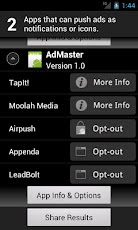
Lookout Push Ad Detector scans your device for the ad networks that can push ads to the Android notification bar, push ad-enabled search icons to your mobile desktop, or push settings modifications to the mobile browser. These ad networks are integrated into apps you may have downloaded. Push Ad Detector will show you which apps on your phone have integrated the most aggressive ad networks.

Push ads can be frustrating and annoying. These ad networks are integrated into apps, but because the ads are displayed outside an app, it's very difficult to find out exactly which app is enabling these ads. With Push Ad Detector, users can make informed decisions about what apps and ad networks to keep on their phones.

Push Ad Detector also shows users exactly what personal data is being collected by these ad networks, and if it is being done so securely.

At this time, Push Ad Detector does not detect the presence of all mobile ad networks. The six ad networks that are detected use the most aggressive push ad techniques.

Ad Networks Detected
• Airpush
• Appenda
• LeadBolt
• Moolah Media
• Startapp
• TapIt!

Sunday, January 29, 2012

SnowDeer Web Scrapper: capture whole web page

SnowDeer Web Scrapper
SnowDeer Web Scrapper is web browser which can scrap current page to image file. This is different from other screen-capture application, Snow Scrapper support to capture whole page that is now shown on screen.

Also you can call this application via 'Share Page' from other web browsers(ex. chrome or dolphin browser).

Sunday, January 15, 2012

Google Shortcuts


Free application! 45 Shortcuts to google services.
Google Shortcuts is an application that includes a large number of Google services (45 exactly).
With it, you can access quickly and easily to your sites / services preferred by Google.
The list of shortcuts can be changed as needed, sorting, displaying or hiding the shortcuts.

Services supported:
G. Plus, Gmail, Android Market, Android Market Console (for developers), Google Music, Picasa, Maps, Youtube, Earth, Books, Docs, Reader, Translate, Blogger, Analytics, Admob, Contacts, Cloud Print, Checkout / Wallet, Calendar, Adsense, Adwords, AppEngine, Google Apps, Goo.gl, Finance, Orkut, Shopper, Talk, Remote TV, Offers, Catalogs, News, Currents, Goggles, etc ...

Thursday, January 12, 2012

Google Search App updated


Google Search App updated:
  • Faster, smoother performance, with an updated and simplified user interface.
  • Suggestions for your search grouped by type, with web suggestions at the top.
  • Country-specific suggestions and search results for all countries with Google domains.
  • Long press to remove history items.


Here are some additional tips we’d like to share:
  • Tap the arrow to the right of a search suggestion or history item to add it to your search term before searching.
  • Get suggestions from other apps on your phone - check out searchable items in Search settings.
  • Long press on home screen to add the Google Search widget, if you don’t have it already, to access search faster.

Friday, December 30, 2011

avast! Mobile Security released - Full-featured Antivirus and Anti-Theft security for your Android phone


Protect personal data with automatic virus scans and infected-URL alerts. Stop hackers by adding a firewall (rooted phones). Control anti-theft features with remote SMS commands for: history wipe, phone lock, siren activation, GPS tracking, audio monitoring, and many other useful tools. Your ‘invisible’ app hides itself, making it extremely hard for thieves to find and disable. A standalone yet tightly integrated component of avast! Mobile Security, avast! Anti-Theft is the slyest component on the market. Formerly known as Theft Aware, the Anti-Theft portion of avast! Mobile Security has been recommended by leading industry experts that include T-Mobile, N-TV, AndroidPIT, and Android Police.

avast! Mobile Security
  • Antivirus
    Performs on-demand scans of all installed apps and memory card content, as well as on-access scans of apps upon first execution. Options for scheduling scans, virus definition updates, uninstalling apps, deleting files, or reporting a false-positive to our virus lab.
  • Privacy Report
    Scans and displays (grid) access rights and intents of installed apps, identifying potential privacy risks, so you know how much info you are really providing to each app.
  • SMS/Call Filtering
    Filter calls and/or messages from contact list using set parameters based on day(s) of the week, start time, and end time. Blocked calls redirect to voicemail, while blocked messages are stored via filter log. Also possible to block outgoing calls.
  • App Manager
    Similar to Windows Task Manager, it shows a list of running apps and their size (MB), CPU load, used memory, and number of threads and services – with an option to stop or uninstall.
  • Web Shield
    Part of the avast! WebRep cloud, the avast! Web Shield for Android scans each URL that loads and warns you if the browser loads a malware-infected URL.
  • Firewall
    Add a firewall to stop hackers. Disable an app’s internet access when on WiFi and 3G and roaming mobile networks. (Works only on rooted phones.)


avast! Anti-Theft
  • App Disguiser
    After downloading avast! Anti-Theft, user can choose a custom name that disguises the app (e.g. call it “Pinocchio game”) so that it is even harder for thieves to find and remove.
  • Stealth Mode
    Once anti-theft is enabled, the app icon is hidden in the app tray, leaving no audio or other trace on the target phone – the app is ‘invisible’, making it difficult for thieves to detect or remove.
  • Self-Protection
    Extremely difficult for thieves to remove (especially on rooted phones), Anti-Theft protects itself from uninstall by disguising its components with various self-preservation techniques. On rooted phones it is able to survive hard-resets and can even disable the phone’s USB port.
  • Battery Save
    Anti-Theft only launches itself and runs when it needs to perform tasks. This preserves battery life and makes it very difficult for thieves to shut it down.
  • SIM-Card-Change Notification
    If stolen and a different (unauthorized) SIM card inserted, the phone can lock, activate siren, and send you notification (to remote device) of the phone’s new number and geo-location.
  • Trusted SIM Cards List
    Establish a ‘white list’ of approved SIM cards that can be used in the phone without triggering a theft alert. You can also easily clear the trusted SIM cards list, to leave the one present in the phone as the only trusted one.
  • Remote Settings Change
    A setup wizard guides the user through the installation process on rooted phones. No command-line knowledge is necessary to install Anti-Theft rooted. Also supports upgrading.
  • Remote Features
    SMS commands provide you the following REMOTE options for your ‘lost’ (or stolen) phone:
    Siren, Lock, custom Display properties, Locate, Memory Wipe, covert Calling, Forwarding, “Lost” Notification, SMS Sending, History, Restart, and more.

Wednesday, December 28, 2011

DroidDream Cleaner: Diagnose & repair phones infected with DroidDream Malware

DroidDream Cleaner: Diagnose & repair phones infected with DroidDream Malware
Google recently pulled more than 50 apps from the Android Market after they were found to contain the Android malware DroidDream. If you think your phone is infected with DroidDream, download this cleaner app. For more information on this malware, see http://blog.mylookout.com/droiddream/

To determine whether your phone is infected, download and run DroidDream Cleaner. If you are infected, DroidDream Cleaner will delete the malicious files and repair any damage to your system.


Lookout is a mobile security company dedicated to protecting smartphones worldwide. Rated 5 stars by CNET and PCWorld, millions of users worldwide trust Lookout to protect their phone. Lookout is security and privacy certified by Verisign and TRUSTe.

Monday, December 12, 2011

Intersection Explorer: helps blind users explore their neighborhood.


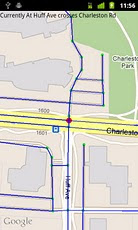
Intersection Explorer speaks the layout of the streets and intersections in neighborhoods as you touch and drag your finger around the map. This helps blind and low vision users get an understanding of a neighborhood both before venturing out and while on the go.

To use Intersection Explorer:
* Start at your current location or enter a new location from the menu
* Touch the screen to speak the streets at the nearest intersection
* Drag your finger along a compass direction or drag in a circle to speak each street that you cross with their compass direction
* Move to the next intersection on the street by lifting your finger
* Use in conjunction with WalkyTalky from the Eyes-Free project, and Walking directions and Places in Google Maps to get a new level of access in the physical world

Sunday, December 11, 2011

AirDroid: wirelessly manage & control your Android


AirDroid is a fast, free app that lets you wirelessly manage & control your Android device from a web browser Over-The-Air.
=================

Enjoy below features after installation from the comfort of your favorite web browser on desktop or other devices:

*Files
Transfer files between Android devices and computers.
Cut, copy, paste, search, rename or delete files on the SD card.

*SMS
Read, send, forward or delete SMS messages.

*Applications
Install, uninstall, backup, search apps and do batch processing.

*Photos
Preview, delete, import, export, set as wallpaper and photos slide show from desktop.

*Clipboard
Share clipboard text between desktop and device.

*Contacts
Group, search, create contacts, check and delete call logs.

*Ringtones
Search, preview, import, export, delete and customize ringtones for phone calls, notifications and alarms.

*Music
Play, search, import, export, delete, or set as phone call, notification and alarm ringtones.

=================

AirDroid also comes with the following inbuilt features:

*Device Status
Real-time ROM, SD Card, Battery, CPU and RAM status report & monitor with charts to demonstrate available/used/total resources, and one-tap memory boost.

*Tasks Manager
Kill or uninstall running apps, batch operation supported.

*Apps Manager
Uninstall, share or check details of user and system apps.

*Files
Control Cut, copy, rename, send/share, delete, sort and create visible or hidden folders and files.

=================
What's the requirements to run AirDroid?
AirDroid should be compatible with most Android devices running Android 2.1 or later (4.0 is not well supported yet). The Web Desktop should be compatible with most modern web browsers, including Chrome 12 or later, Firefox 3.6 or later, Safari 5.0 or later (For best performance IE is not recommended).


Saturday, November 26, 2011

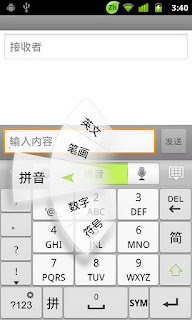
GO Keyboard for Android

GO Keyboard for Android
GO Keyboard can make your typing faster and smarter. It is a essential choice for android mobile.


●Main features::
★Predict in multiple languages and keyboard layouts
★Has accurate dictionaries
★Import contacts
★Support fantasy text output
★Support Emoji
★Support a variety of themes
★Smart to set skin and back ground
★Auto-memory and correct as you type
★Multi-point touch keyboard
★Support the slide input
●Enable GO Keyboard
First step: after download GO Keyboard, go into the “Menu”, click the [Enable GO Keyboard] to enable.
Second step: long press any input box until popup a menu, choose “Input method”, then choose “GO Keyboard”
●Gesture support:
Swipe left or right to switch layouts
Swipe down to close the keyboard
●Support languages:
☆Pinyin, wubi, stoke, handwriting and voice input
☆cangjie,zhuyin,simple cangjie
☆Ukrainian -UG-українська мова
☆Bulgarian-BG-Български език
☆German-DE- Deutsch
☆Russian-RU-Русский язык
☆French-FR- française
☆Czech-CS- čeština
☆Croatian-HR- Hrvatski
☆Romanian-RO- română
☆Portuguese-PT-português
☆Turkish-TR- Türkçe
☆Arabic-AR-اللغة العربية‎
☆Slovak-SK- Slovenčina
☆Polish-PL- język polski
☆Norwegian-NO- norsk
☆Hungarian-HU- Magyar
☆Greek-EL- Ἑλληνική
☆Finnish-FT- Suomi
☆Dutch-NL- Nederlands
☆Danish-DA- dansk
☆Swedish-SV- svenska
☆Spanish-ES- Español
☆Hebrew-HE- Ivrit
☆Italian-IT- Italiano
☆Japanese-JA-日本語
☆Farsi-FA-فارسی
☆Urdu-UR-اردو
☆Lithuanian-LT-Lietuvių
☆Catalan-CA-Català
☆Korean- KO-조선어
☆Indonesian-ID- Bahasa Indonesia
☆Malay- MS- Bahasa Melayu
☆Slovenian- SL-slovenščina
☆Thai- TH -ไทย
More cool ! More free!