Showing posts with label Productivity. Show all posts

Wednesday, July 31, 2013

Google official Adsense App


The Google AdSense app provides an easy way to access key data from your AdSense account. Access reporting
features anywhere, directly from your mobile phone. The first version of the app gives you access to: the key earnings information, top custom and URL channels, ad units and sites reports, payment alerts.

https://play.google.com/store/apps/details?id=com.google.android.apps.ads.publisher

Wednesday, March 20, 2013

Google Keep


Google Keep quickly capture what’s on your mind and recall it easily wherever you are. Create a checklist, enter a voice note or snap a photo and annotate it. Everything you add is instantly available on all your devices – desktop and mobile.

With Google Keep you can:
• Keep track of your thoughts via notes, lists and photos
• Have voice notes transcribed automatically
• Use homescreen widgets to capture thoughts quickly
• Color-code your notes to help find them later
• Swipe to archive things you no longer need
• Turn a note into a checklist by adding checkboxes
• Use your notes from anywhere - they are safely stored in the cloud and available on the web at http://drive.google.com/keep


Friday, January 11, 2013

Preview the latest features on Chrome Beta for Android!


- Preview the latest features: Try out the newest features. (Sometimes these may be a little rough around the edges.)
- Give early feedback: Let us know what you think and help make Chrome for Android a better browser.

You can install Chrome Beta alongside your current version of Chrome for Android. Chrome Beta will request additional permissions when using Chrome Sync for the first time.

Chrome Beta for Android!

Friday, October 19, 2012

Official Google Calendar app lands Google Play


Google Calendar app

Experience Google Calendar on devices running 4.0.3 or later.

The Calendar app displays events from each of your Google Accounts that synchronizes with your Android device. You can also:
- Create, edit, and delete events.
- View all your calendars at the same time, including non-Google calendars.
- Quickly email all event guests from a notification with a customizable message.

Known issues with HTC devices:
- Day and week views may not work on some HTC devices.
- Notes and pictures may be removed from all calendar events, but will still be available in HTC's Notes app.
- Local unsynced events may be lost after installing Google Calendar.
- Notifications won't make sounds unless HTC's Calendar app is disabled.
- Touching an email invitation in a mail app opens Calendar in the browser rather than the app.


Monday, September 10, 2012

Google Drive updated for iOS and Android


With Google Drive apps for Android and iOS, your stuff is also available wherever you are, on any device. Search for and share files, access them offline, collaborate with others in real time on documents and *spreadsheets, and flip through presentations on the go. Learn more and get the apps at http://www.google.com/mobile/drive.

*Creating and editing spreadsheets on mobile is not yet available on Android or iOS. Check http://googledrive.blogspot.com/ to find out when it is live.


Wednesday, August 29, 2012

Microsoft official SkyDrive App land on Android


Microsoft official SkyDrive App

SkyDrive is the place to store your files so you can access them from virtually any device. With SkyDrive for Android, you can now easily access and share files on the go. You can also upload photos or videos from your phone to SkyDrive.

Features
• Access all of your SkyDrive content including files shared with you.
• View recently used documents.
• Choose multiple photos or videos to upload from your phone.
• Share your files and photos – send a link in email or in another app.
• Open your SkyDrive files in other Android apps.
• Manage your files – delete, or create new folders.


Wednesday, July 11, 2012

Droid NAS: Turn your Android to be a NAS


Droid NAS allows you to share folders over a Wi-Fi network, making your Android device visible as a Bonjour computer in Finder on your Mac. Turn your phone or tablet into a wireless flash drive with a single tap!

Different profiles can be used to quickly choose which folders to share. Assign your home or office Wi-Fi networks to profiles and Droid NAS will auto-select profiles on start.

You can additionally share any folder on your device (including external SD cards) or remove unnecessary shares. Just tap and hold on the list of shares.

Supported systems:
- Mac OS X.
- Android: apps like ES File Explorer, Solid Explorer, GTVBox Video Player.
- Windows is NOT supported because it can't connect to SMB servers via a non-standard port.
- Linux most probably also won't work.


Sunday, July 1, 2012

Official Google Analytics app


Essential data for your sites & apps. Anywhere, anytime.

The Google Analytics app shows what is new and what is important on your Google Analytics profiles. See real time statistics, customizable dashboards and intelligence events on your phone.


Wednesday, June 20, 2012

WinZip on Android


Makes it easy to extract and handle Zip files on your Android phone and tablet!


WinZip, the world's #1 zip utility, makes it easy to view, open and save zip files on your Android device, whether they're attached to an incoming email, downloaded from a web page or opened from an SD memory card.
WinZip for Android Top Features
- Receive a zip file and view supported image, text and web files directly within the WinZip app. Easily open other popular file formats with 3rd party app integration.
- Open encrypted Zip files (including AES128 and AES256) to review sensitive material safely while on the go.
- Copy unzipped content to the clipboard to paste into an email or another application. Save the last extracted zip file to access at later time.
- Automatically unzip and install Android apps (.apk files) delivered as .zip files from Google Play or the Amazon Appstore.
File Support and 3rd Party Integration

WinZip for Android lets you view:
- Photos and images (.jpg, .jpeg, .png, .bmp, .gif)
- Text files (.rtf, .csv, .txt, .ini, .inf, .bat, .js, .log, .xml,.css, .java, .cs, .h, .m,.cpp,.c,.sql,. properties)
- Web files (htm, .html,.jsp,.asp)
WinZip for Android lets you open other popular file types in 3rd party apps:
- Word documents (.doc, .docx)
- Excel spreadsheets (.xls, .xlsx)
- PowerPoint presentations (.ppt, .pptx)
- PDF files (.pdf)
WinZip for Android builds on the success of WinZip for iOS, introduced earlier this year and already downloaded by more than a million people. WinZip tools are now available on all of the industry’s most popular platforms – Windows, Mac, iOS and Android.
Compatible with Android operating systems 2.1 (Eclair), 2.2 (Froyo), 2.3 (Gingerbread), 3.x (Honeycomb) and 4.x (Ice Cream Sandwich), WinZip for Android is available now as a free English app.

Tuesday, April 24, 2012

Google Docs is now a part of Google Drive!

Keep everything. Share anything
* With Google Drive, you can store all your files in one place, so you can access them from anywhere and share them with others 
* Use the Google Drive Android app to access your photos, documents, videos and other files stored on your Google Drive
* Upload files to Google Drive directly from your Android device
* Share any file with your contacts 
* Access files others have shared with you on Google Drive
* Make any file available offline so you can access them even when you don't have an Internet connection
* Create and edit Google documents with rich text formatting 
* Edits to your Google documents appear to collaborators in seconds
* Make quick changes to spreadsheets
* View your PDFs, presentations and more
* Upload and convert files to the Google Docs format
* Take a photo of printed text and convert it to a Google document
* Optimized experience to take advantage of larger screens for tablet users, Honeycomb (Android 3.0+)

Saturday, April 21, 2012

Infinite Painter Free

Imagine. Create. Experience the natural artistic environment of Infinite Painter. The Infinite Painter Free app offers a multitude of brushes designed to replicate realistic mediums. It offers a variety of features built to optimize and streamline the workflow of the artist. It works well with Infinite Design, allowing the user to export their projects from Infinite Design into Infinite Painter with the click of a button. It has five different types of symmetries you can use (X-Axis, Y-Axis, Arbitrary Angle, Radial, and Kaleidoscopic). It utilizes a smart menu system and a fluid interface, seeking to make work flow on the go much easier. Navigation is as easy as putting two fingers on the screen and dragging the canvas or pinching to zoom. The auto save feature also comes in handy, automatically saving your layers and reloading them when you return. You can save your project, and all of your layers stay intact. You can also export your image with or without the background. Besides these fundamental necessities, Infinite Painter also offers image importing in four different ways (Camera, Gallery, Google Image Search, and the current painting itself). After importing an image, you can translate, re-size, rotate, flip or recolor it to your liking. You then have the option to either stamp or rub the image onto the canvas. Infinite Painter also provides a dedicated blending button, allowing you to switch easily from painting to blending as you bring your artwork to life.
**If you have a Galaxy Note, search for your version of this app**


Suggested workflow: I usually like to take advantage of Infinite Design's limitless canvas in creating my design and laying out my artwork, then I use Infinite Design's Export-to-Painter feature to bring it in and start painting on a layer beneath the line-art. This approach takes advantage of the flexibility offered by Infinite Design and also the complexity offered by Infinite Painter.
Key Features:
-Six layers and unique layer options: Merge, Flip, and Duplicate.
-Carefully designed brushes to replicate natural mediums.
-Five types of symmetry: X-Axis, Y-Axis, Arbitrary Angle, Radial, and Kaleidoscopic.
-Saving layers and the ability to save the image on a transparency for ease of use in Photoshop.(Only in full version)
-A relative menu system.
-Import images from all over the internet with Google Image Search.
-Rub images onto the canvas.
-A fluid interface that is fully optimized for touch screen devices.

Infinite Design (Free Version)

Take your creative passion to a whole new world. The Infinite Design (Free Version) app seeks to put the power back in your hands, allowing you to create complex and beautiful designs effortlessly. It offers a variety of different brushes. It has five different types of symmetries you can use (X-Axis, Y-Axis, Arbitrary Angle, Radial, and Kaleidoscopic). It utilizes a smart menu system and a fluid interface, seeking to make work flow on the go much easier. Since all the paths created are vector-based graphics, you can zoom in, zoom out, or pan over infinitely thus making your phone a window to an entire world for your imagination to run free. Those who are fond of Photoshop will find comfort in the Layers system which allows you to work on different aspects of a project with out messing with other ones. The eraser also has a built in softness function that allows you to define which paths can be erased and which ones cannot be. The various special paint attributes consist of four types of blurring, embossing or inner/outer shadowing. The auto save feature allows for peace of mind, allowing you to freely leave the app. It will save the project for you and load it on your return. This is one design app that should not be taken lightly. I hope you enjoy.


Key Features:
-Infinite canvas (pan, zoom, or rotate)
-Infinite layers and unique layer options: Split, Merge, Flip, Duplicate, and the ability to apply a perspective transformation to a layer.
-Carefully designed brushes to ensure optimal workflow on the go.
-Five types of symmetry: X-Axis, Y-Axis, Arbitrary Angle, Radial, and Kaleidoscopic.
-Infinite undo/redo system.
-A relative menu system.
-Import images.
-Special Effects include four types of blurring, inner or outer shadowing, and embossing.
-A fluid interface designed for fluidity and fully optimized for touchscreen devices.
-Save as JPEG or PNG (with background or without background).
-Export to SVG for editing in your favorite graphics editor. Tested and works in Adobe Illustrator and Inkscape.
-Export your image to Infinite Painter.
- Saving images and exporting projects to SVG(Scalable Vector Graphics) format are disabled in the Free Version, but you can test out all the tools the app has to offer. Any project files you save with the Free Version can be opened with the Full Version and then exported to SVG or saved as images. The Full Version is also ad-free.

Monday, April 2, 2012

Zoolz: access and share your files anytime andywhere

Zoolz: access and share your files anytime andywhere
Zoolz
Zoolz is a free 4GB service that enables you to effortlessly connect all your family or teammates so you can all access and share all your files, view your photos, and play all your music and videos that are stored on your Windows PCs, external and network drives directly from your iPhone, iPad, iPod touch, Android, or Facebook. Earn up to 20 GB free!

Features
• 4 GB FREE fully functional account
• View your photo memories in a timeline to discover long lost photos
• Share any file no matter how large to anyone
• Share any photo on Facebook instantly
• Access your encrypted files from your mobile
• Search for your files on Zoolz
• Read your documents
• On a plane, no problem! Listen to your music offline
• Save your photos to your photo gallery
• Fully integrated Facebook App

Saturday, March 17, 2012

GO Launcher HD for Pad

GO Launcher HD for Pad
GO Launcher HD is the exclusive tablet version of GO Launcher EX on Android platform. It brings you with the fascinating interface, practical utilities, as well as extremely personalized and smooth operating experience.

Ready for a brand new operating experience on Android tablet Platform? Try it out!

Features:
Support dragging operation on dock bar
Add / Delete screens
Self-define folders to categorize apps
Check running apps and clear all
Brand new adding interface

GO Launcher HD for Pad

Thursday, March 1, 2012

OnLive Desktop: Share a PC desktop with all your devices wherever you are


OnLive® Desktop is a service that provides a seamless, no-compromise, instant-response cloud-based PC desktop, wherever and whenever you want it. OnLive brings to your Android tablet a high-performance PC experience, regardless of the content, even when interacting with fast-action media.

Features
• Instantly view, edit and create documents using actual Microsoft® Office Word, Excel and PowerPoint
• Easily transfer files between OnLive Desktop and other devices
• Experience high-performance, instant-response PC applications
• Interact with lag-free animation and video
• Works with most Bluetooth keyboards and mice (left-click only)


Thursday, February 23, 2012

Google Docs for Android updated with Real-time collaboration


What's new in updated Google Docs for Android:
  1. Create, view and edit Google documents with our new Android editor
  2. Rich text formatting (bold, italics, underline, font color, background color)
  3. Layout tools (bulleted lists, numbered lists, indentation)
  4. Real-time collaboration - see edits from others in seconds
  5. Cursor presence and highlighting


Wednesday, February 8, 2012

OneNote Mobile for Android, by Microsoft Corporation

Microsoft OneNote Mobile for Android
On your PC, phone, or the web, OneNote goes everywhere

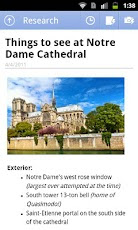
Microsoft OneNote Mobile for Android is a note-taking app for capturing all of your ideas and to-dos on the go, brought to you by Microsoft Office.

Create notes with text, pictures, and bullets. Make and manage to-do lists with checkboxes. Then keep your notes in sync using free Microsoft SkyDrive® online storage to access, edit and manage them from virtually anywhere, from your PC or almost any web browser. Access your notes online at www.skydrive.com.

**** With the free version of OneNote Mobile for Android you can access, create and edit up to 500 notes. Once you reach this limit you can still view, delete, and sync your notes. To continue taking and editing notes, you can upgrade OneNote Mobile for Android to unlimited use through an in-app purchase.****


Requirements:
▪ Must have Android 2.3 or higher.
▪ A free Windows Live ID is required to use OneNote Mobile for Android - use an existing ID or let OneNote help you sign up.
▪ Web functionality uses the free OneNote Web App available on SkyDrive, which requires a supported web browser.
▪ OneNote Mobile for Android opens notebooks created in Microsoft OneNote 2010 or the OneNote Web App.


Saturday, October 29, 2011

Skitch: annotate, edit and save your photos & scribbles

Skitch: annotate, edit and save your photos & scribbles
Skitch
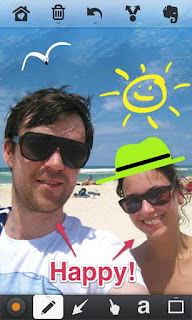
Skitch, the popular desktop app has gone mobile. Annotate an image with arrows, shapes and text. Sketch something new and markup an existing photo, then save your creations to Evernote or share them with other applications.

Drawing attention to your images has never been easier. Here are some ways to use Skitch:
- When you’re at a conference, take a snapshot of the people you meet, annotate it with their names and save it into Evernote.
- Annotate any image, screenshot or photo saved in Evernote thanks to a streamlined Skitch/Evernote integration.
- Download a screenshot attached to email. Open it in Skitch and add your comments. Save to Evernote for later review.
- Take a snapshot of something awesome, resize it, draw an arrow, add a caption, then post the image on Twitter or Facebook.
- Grab a picture of a whiteboard in a meeting or lecture, add a comment and save to Evernote.
- Quickly sketch out a map, diagram or unicorn!

Powerful features to help you get even more out of Skitch:
- Zoom and crop images.
- Create smooth, lines and scribbles to explain an idea.
- Add text using a special high-contrast coloring scheme for readability.
- Markup text with the semi-opaque highlighter tool.
- Re-position and delete shapes, text and drawings at any time.
- Share your work with with any application that accepts images.
Skitch is fast and fun!

Monday, September 26, 2011

SanDisk Memory Zone - Take control of your memory: On your phone. On your card. In the cloud.


SanDisk Memory Zone offers you more memory management functionality than any other application available for the Android™ phone.

SanDisk Memory Zone puts you in complete control. Manage and backup both your local and cloud memory with one free app. Move files back and forth from your memory card to select cloud services, or from the cloud directly to your phone.

Improve the performance of your phone in seconds by moving files from your phone’s internal memory to your memory card.

SanDisk Memory Zone not only allows you to transfer and back up your files, it also allows you to secure them through a password protection feature. So you have the peace of mind knowing your videos, photographs, music and other files are not only available, but they’re available only to you.

Get seamless, integrated storage connectivity between your phone, your memory card and your files in the cloud. It’s never been easier to enjoy, manage, share and protect your digital assets.

Unlike utilities with awkward and difficult to navigate folder structures, SanDisk Memory Zone has an intuitive, graphical user interface that lets you get the job done, fast.

Designed by the global leader in flash memory cards, SanDisk Memory Zone allows you to visualize your memory usage by content type and size.

Wednesday, September 14, 2011

Goggles updated 1.6


Google Goggles updated 1.6 that enhances the camera on your Android-powered phone. With this new opt-in feature in Goggles, you can simply photograph an image using your phone’s camera, and Goggles will work in the background to analyze your image. If your photo contains items that Goggles can recognize, the app will notify you.

source: Official Google Mobile Blog - Your smartphone camera is now smarter with Goggles 1.6