With the Microsoft Remote Desktop app, you can connect to a remote PC and your work resources from almost anywhere. Experience the power of Windows with RemoteFX in a Remote Desktop client designed to help you get your work done wherever you are.
Features
+ Access to remote resources through your Remote Desktop Gateway
+ Rich multi-touch experience with remote desktop protocol (RDP) and RemoteFX supporting Windows gestures
+ Secure connection to your data and applications with breakthrough Network Layer Authentication (NLA) technology
+ Simple management of all remote connections from the connection center
+ High quality video and sound streaming with improved compression and bandwidth usage
To establish connection between Microsoft Remote Desktop Client to connect between remote PC, you have to do some setup. Read: Getting Started with Remote Desktop Client on mobile
Showing posts with label Business. Show all posts
Friday, October 18, 2013
Thursday, September 19, 2013
Quickoffice for Android is now free for anyone with a Google Account
Quickoffice from Google is now free for anyone with a Google Account. It lets you create and edit Microsoft® Office documents, spreadsheets and presentations on your Android phone and tablet. Sign in with your Google Account to save work in Google Drive, which gives you up to 15GB of free storage and lets you access your files from any mobile device or computer.
With Quickoffice and a Google Account you can:
- Create and edit Word, Excel and PowerPoint files
- Access files in Google Drive and on your device
- Open and view PDF files
- Share files through previously shared Google Drive folders
- Attach files to emails
With Quickoffice and a Google Account you can:
- Create and edit Word, Excel and PowerPoint files
- Access files in Google Drive and on your device
- Open and view PDF files
- Share files through previously shared Google Drive folders
- Attach files to emails
Monday, July 16, 2012
OfficeDrop: Turn Your Android Into a Scanner – Search and Share Files From Anywhere

OfficeDrops is a free online cloud storage service that lets you scan paper, text search paper & digital files and share files - right from your Android device, the web or from your Windows PC (Mac coming soon).
How OfficeDrop works:
* Scan with your device’s camera.
* Upload your scan into your OfficeDrop cloud storage account and it becomes a PDF ready to be searched, shared or organized.
* The PDF is automatically saved onto your Windows PC if you upload it into a folder that you’ve synced using OfficeDrop’s Windows Sync Client (available for free on officedrop.com).
* Then search for text in the scan from your Android device or from the web!
Key Features:
* Access scans, files and documents from anywhere, anytime.
* Turn your Android phone and tablet into a mobile scanner, creating multi-page PDFs that you can download, share or email.
* Search for words, phrases or numbers within documents – even scans – with OfficeDrop’s OCR and file search engine.
* Sync files to and from your Windows PC using OfficeDrop’s free Windows sync client; automatically uploads any file in any folder to the cloud for mobile searching & sharing.
* Share files and folders from your device, the web or Windows desktop.
* Scan from your Mac to the cloud and access on your device with OfficeDrop’s ScanDrop scanner software.
* Organize your documents and files into folders and tag them with labels for easy access.
* Personal email address {username}@myofficedrop.com allows you to forward emails and attachments into your account’s secure Inbox.
* Online service connects to Evernote, Google Docs, FreshBooks, RightSignature & more.
If you do not have an OfficeDrop account the app will ask you to create a free one. Then you can start scanning and uploading to the cloud! Plan types:
* Free plan with a massive 5 GB of Searchable Storage, top 3 search results displayed, web, mobile and tablet access included
* Single User paid plans with starting at $9.99 per month with unlimited document search results and larger search storage
* Multi User paid plans starting at $44.95 per month with unlimited document search, larger searchable storage, multiple user logins and admin controls
Tuesday, April 10, 2012
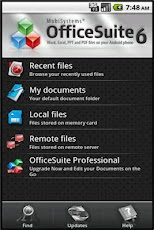
OfficeSuite Viewer 6: Open Word, Excel, PowerPoint and PDF documents on you Android phone


OfficeSuite Viewer 6 is a universal and FREE and AD FREE office document viewer for Android enabling you to open native DOC, DOCX, RTF, TXT, LOG, XLS, XLSX, CSV, PPT, PPTX, PPS, PPSX, EML, PDF and ZIP files and attachments ANYWHERE, ANYTIME!
OfficeSuite 6 New Features
* Page view for Word and other text documents
* Headers and footers in Word documents
* Page numbering in text documents
* Filters in Excel so you can quickly and effectively handle your data
* SugarSync compatibility so you can now access your remote files in SugarSync
* WordArt support in text documents
* Optimized for Android 4.0
Friday, February 24, 2012
Box offer Android user 50GB online storage

Box for Android and Android Tablet lets you view and share files from anywhere!
Box provides simple, secure sharing from anywhere – letting you easily store files online, send big files quickly, access content from your Android phone or tablet, and collaborate with others. Now through Friday, March 23, 2012, log in to receive a free 50GB account upgrade!
What's new:
- View and add comments to files
- Invite folder collaborators
- Improved uploading experience, including the ability to batch upload multiple files from an SD card
- Updated UI including use of the standard Action Bar
- Now localized in German, Spanish, French and Italian
- App2SD!
- Contacts Permission: We only use this permission to quickly retrieve email addresses when you want to invite collaborators, and do NOT store any contact information on Box's servers.
Monday, November 7, 2011
Box - view and share files from anywhere


Box for Android and Android Tablet lets you view and share files from anywhere.
Box provides simple, secure sharing from anywhere – letting you easily store files online, send big files fast, access content on your Android phone or tablet, and collaborate with others. Box for Android and Android Tablet gives you 5 GB FREE to:
- Upload, access and view content on your Android phone or tablet
- File caching for faster access to key content
- SSO for simple login process
- Easily share files and folders with links
- Find files fast with built-in search
- Save files you create in other Android apps to your Box account
For iPhone or iPad user: Get a FREE 50 GB lifetime account for file storage and sharing through Dec. 2, 2011. To get your automatic upgrade, download the Box app on your iPhone or iPad and register or sign in to your account.
Link: http://itunes.apple.com/us/app/box.net/id290853822?mt=8
Thursday, September 29, 2011
JavaOne 2011 app on Android


The JavaOne 2011 application provides a comprehensive view of all things JavaOne— the flagship annual conference for Java developers worldwide ! taking place in San Francisco from October 2-6, 2011. Find out what's happening and where at JavaOne ‑all of the activities you need to attend, all of the people you want to meet—all on your mobile device.
Key features include:
*Daily conference highlights
*Information on keynotes, activities, and events: who, what, where, when
*Access to Schedule Builder, where registered attendees can update their schedule directly from the app**
* Links to descriptions and locations of the Java DEMOgrounds and exhibitor and sponsor listings
* Links to key social networks: blogs, Facebook, Twitter, LinkedIn, Oracle Mix
* Links to maps, hotel shuttle schedules, and other logistics information
* Links to local restaurants, tour information, and the Show Your Badge discount program
Subscribe to:
Posts (Atom)